


FAQ
How should site be used for best user experience?
We recommend using site from desktop or laptop with most recent version of Chrome, Edge, Firefox, or Safari browsers. Our site might work just fine with other browsers but we did not test our site with other browsers. It is possible but not as easy to order using a mobile device but leads should not be downloaded onto, viewed, or edited with a mobile device.
What are reasons why I may have trouble creating new account?
- You did not enter a valid email as your user name
- You already created an account in the past with that email/user name even though you may have never completed registration process so account could still be inactive.
- You did not enter a valid cell phone number
- Your email is not valid or you did not get your registration confirmation email with your 5 digit activation code you need to activate your account
- Registration confirmation email from us went to your junk mail folder or was blocked due to strict spam filters set up by you or your company. We recommend white listing emails from us.
- You did not successfully complete the reCAPCHA by selecting the checkbox “I am not a robot”.
- Our site blocks non-US IP addresses. You need to register your account from a computer in USA.
- Check your browser version and update it to the latest version.
- You did not click at least 1st of 2 checkboxes while registering
Note: You should receive order confirmation email with 5 digit code needed to complete registration process within minutes of registering so if you do not then review the above to see why and call us if you are unable to resolve the issue on your own.
What can I do if I forgot what email I used as my user name or what password I used?
Search for your registration confirmation email that includes your user name and password in your email inbox or have us find it for you. If you can’t find your login details in your records or in your email inbox or if it didn’t auto save it in one of your browsers then you can click reset password button to receive a link by email allowing you to create a password of your liking or you can ask us to generate a new random password for you. Are you entering password with proper case? Passwords but not user names are case sensitive. We have one way encryption that keeps us or you from being able to recover your original password.
If you can’t figure out what email you used for your user name then contact us to see if we can look up your user name by using your name to look it up by which we usually can do as an admin and only as a last resort create a new account but that will allow you to get duplicates of leads you may have ordered with your other account so we don’t advise it. There are no restrictions on type or number of characters that can be used in creating a password or user name.
Why am I having trouble placing order online?
a. Make sure the card billing address you entered during checkout process is up to date and same as one in your account profile area. Full address in profile must match address entered during checkout.
b. Make sure order exceeds the minimum order amount (usually $100) and is for less than default spending limit. Contact us if you want us to raise your spending limit or lead volume limit.
c. Verify card information
d. If your card continues to be declined use a different credit, debit, burner card, or pay using same card through Paypal as guest if you do not have a Paypal account or with funds in Paypal if you do have a Paypal account
f. Ensure enough funds in bank account
g. Ensure bank does not require further text verification to make sure transaction is legitimate
h. Order must be placed from computer in USA and with card drawing funds from US bank account
i. Make sure placing order from 4:00 am PST to 11:00 pm PST
j. Make sure have not placed more than 1 order per hour or 2 orders per day using same credit card for same agedleadstore account. If you need to order more let us know and we can place additional same day order for you as admin.
Note: You should receive order confirmation email that acts as your order receipt within minutes of ordering so if you do not then review the above to see why and call us if you are unable to resolve the issue on your own. If the leads you ordered do not show up instantly in orders area of site and if you do not get order confirmation email then that almost always means order failed to be placed and your card was not charged. Once you place order click on orders tab to retrieve your leads as they will be there waiting even though at times you will not get order conf email since it went to junk folder or for some reason email was not delivered. We recommend using our site from desktop or laptop with most recent version of Chrome, Edge, Firefox, or Safari browsers. Our site might work just fine with other browsers
What happens if some or all of the leads I ordered do not show up instantly?
While it is very rare that your order would not instantly be available for download in orders area of site, if it does not show up just send an email to info@agedleadstore.com or call 949-861-3122 and we can add those to your account in most cases right away.
Why are phone, email, and other columns at times not readable or seem to be missing?
We run the Evergreen Lead Optimization process continuously on our site to provide the best possible leads to our clients. Very rarely it might happen that some phone numbers or other required fields might be missing from your order. While this is a very rare occurrence, if it does occur just send an email to info@agedleadstore.com or call 949-861-3122 and we can either fix your original order so the missing fields will be present once you redownload your order, repull the entire order, or add some replacements to your account.
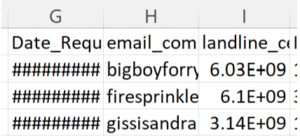
Some values in columns like home_phone, cell_phone, email, address, date, and dob at times may at first appear to not be usable as shown below but it is usually just that the columns are not wide enough to allow you to read the contents of the cells and to fix this all you have to do is widen the columns half an inch to the right. For exa if landline_cell_combo column’s values are looking all garbled and you want to be able to read them and if landline_cell_combo column is column K then put your cursor on vertical line at top of excel spreadsheet between the K and L and left click on it and hold it down and drag to right half an inch and then you will be able to read all 10 digits of the phone number.
How does agedleadstore obtain its leads?
Our leads are Internet insurance or financial quote requests that we get from real time lead aggregators, lead generators, publishers, or lead brokers. Our lead vendors typically used search engines, email, display ads, Facebook ads, or mobile ads to generate the leads they provide us with. The leads should not have been generated using any incentivized means and will very rarely include any coregistrations or surveys. We do not generate any leads inhouse. We aggregate massive amounts of leads monthly, put them thru various 3rd party and inhouse validation and enrichment processes upon import and periodically thereafter, and then make them available for sale at agedleadstore.com.
How do I order aged Internet leads?
First please click on Register/Login and then Create New Account and take a minute to create a free account. Once you enter a user name(your email), password, mobile phone, and solve an equation you will be sent a registration confirmation email and text instantly that contains a 5 digit code. You need to then click on register/login and enter the 5 digit activation code to activate your leads account. You will then be able to search through our massive lead inventory spanning 8 lead types that are presently available on our site and order any you want for instant retrieval in the orders area of the site.
- Select lead types eads from browse leads or Lead Types tab.
- Select what filters you want from each of the 6 advanced filtering options – after you are done making all your filtering selections click Apply Filters just once. Review each of the 6 filter selections and either leave them set at default settings or customize any of them you like to better target your ideal prospect at no additional charge (except for lead age range if you want to call that a filter).
- lead type: lead age range
- states
- age – consumer age range
- risk type – high or low or either
- area codes
- zip codes
- This will prompt you to create a new account if you do not already have one before it gives you your count for the filters you requested. If you already have an account set up then you will now see how many leads your search resulted in. It just takes a minute to create a new account by entering a user name and password along with your contact information and there is no deposit required, no setup fee, no recurring billing, and we do not store your card details online.
- After registering, the search results page (your lead count) will be displayed to you and you will see Selected Filters showing you what you chose for each of the 5 filters. There is a Change Filters tab in case you want to change one of the 5 filters and run a new count before proceeding. Below that you will see Number of Matching Leads and this shows the total number of leads in our database that match your filter set. Please enter the amount of those available that you would like to buy in the Quantity to Add box and then click Add Leads to Cart.
- You will now be taken to the Shopping Cart page where it will show you the number of leads with what filters make up each order you added to the shopping cart. You are given 3 choices:
- Update Cart: this just lets you update cart in the event you remove an order from the cart. If you want to make a change to the quantity selected for the most recent order you just placed in the cart you can either hit the back button to return to the prior screen and enter a new amount of leads in the Quantity to Add box or you can select Remove and then Update Cart and that will remove the order and you can then select your filter set once again and add the new amount of leads you want to order.
- Checkout: Once you have selected all the orders you want to place at this time click this button and you can pay by any credit card though paypal or our merchant account to receive the leads instantly. If you do not want to pay by credit card you will have to contact us to pull the order for you after we have received some alternate form of payment from you.
- Continue Shopping: This allows you to go grab additional orders with new filter sets and add them to your shopping cart (for exa. you could add to your cart all the Ohio 513 area code health insurance leads in the 2-30 day, 31-85 day, and 86 day + day age range).
- Enter your credit card details and check the box at the bottom to express your agreement to our Terms and Conditions and Lead Purchase Agreement., and then press the Continue button.
- Click on Orders tab to instantly retrieve the leads you just bought.
What fields are included on your leads?
Our 8 types of aged Internet leads include the fields name, full postal, email(s), phone(s), date, usually IP, usually Jornaya leadid and/or Trusted Form
and any of 5 insurance lead types include date of birth. Each lead type also has various industry specific fields such as:
auto insurance leads – make, model, year, trim for 1-3 vehicles, gender, and other auto related fields
home insurance leads – at times gender, sq ft, year built, make, model, year
life insurance leads – coverage amount and at times gender, height, weight, policy type, term, smoker (y/n)
health insurance leads – at times gender or income
mortgage – loan type, loan amt, prop type, prop value, LTV, credit, and at times mort balance, mort rate
solar – electricity bill, electricity firm, and at times roof type, shade, or credit
home improvement – project type
How do I go about receiving volume discounts?
The system calculates the price based on the volume and age of the leads selected. If the price being displayed is not what you expected review our pricing chart and the amount of leads you ordered and revise your order to reflect an amount of leads that will let you qualify for your target price per lead. If you want more than 40,000 leads in any particular age range please contact us and we can likely offer you further volume discounts.
Will I be charged more if I select certain filters?
You are not charged more for any of the filters states, consumer age, risk type, or area code or zip code so feel free to select whatever filters will best deliver you a qualified prospect for your services while still getting you enough leads to keep you busy. You also may want to not keep your filter set too restrictive or else not enough leads will be available to allow you to take advantage of the 1st volume price break at 250 leads.
How do I get the leads I paid for?
Once you submit an order the leads will instantly be retrievable by clicking on the Orders tab at top of the instant demand area viewable as long as you are logged in. Upon placing your order you will also immediately get an order confirmation email containing a link that you can click on to go to your orders page to instantly retrieve your leads. This email also outlines all your order details so you can use it as a receipt/invoice.
What methods of payment do you accept?
We accept payment online in a secure environment by Visa, Mastercard, Discover, American Express, or Paypal. You can either pay us thru paypal using funds in your paypal account or you can pay through paypal using any credit card. If you do not have a paypal account set up you can sign into paypal as a guest and pay with any credit or debit card. Sometimes paypal will accept a payment from a certain credit card that our merchant account declines. If you want to use a different payment method, just contact us with your order details and we will send you a purchase order and once we receive payment by check, wire, bank deposit, or Western Union, we will make the leads available to you in the Orders area.
How are you different from the competition?
We have been focused solely on the aged Internet lead space for 20 years which has led to us becoming not just the longest standing but also the most respected aged Internet lead marketplace in America today. Our passion for disruptive innovation, ongoing investment in trailblazing big data technology, best practices, integrity, well established vendor network, and hard work have made us the undisputed leader in the aged lead space and you can count on us to be here for you for many years to come.
Our in-house proprietary Evergreen Lead Optimization Technology enforces our strict quality standards by not only removing about 50% of the leads we get from our vendors that do not pass our initial or ongoing quality control processes but also greatly enhancing those leads that do successfully get imported into our platform so our clients can count on being able to receive high value, accurate leads on an ongoing basis.
We offer tens of millions of highly validated, searchable aged Internet leads of 8 types and we typically add about 250,000 more leads 3—60 days old monthly. These records are all consumer-initiated online requests for insurance, mortgage, solar, or home improvement.
We offer pay as you go pricing with no deposits or set up fees, and no recurring billing.
We also offer instant lead delivery 24/7 and a very lenient return policy.
How do you recommend we work the leads?
To learn our secrets to success with aged leads see our Aged Leads Blog or check out our Youtube channel
https://www.youtube.com/c/AgedLeadStore Back to Top
Below are 2 of our most popular videos for getting started working aged leads:
I forgot my password. How can I get a new one?
At the bottom of the register/login page click on Reset Password button and follow the process to get a new password so that you can login once more.
What if I want more leads than you have available in inventory?
If you do not see as many leads as you had hoped for try either doing a search with the same filters in a different lead age range and/or adding zip codes or otherwise loosening up some of your filters. If you still cannot find enough leads to make you happy or if you bought most or all of what we had available and expect to want more in a week or so let us know what filter set it is that we need to increase inventory in so we can attempt to have them waiting for you next time you need more leads. We typically add tens of thousands of leads 15-60 days old monthly in each of our 8 lead types (except for home improvement where volume added monthly usually just a few thousand leads). We send you inventory alert emails on 15th and 30th of each month to let you know how many leads we presently have matching your filters based on your saved filters in your profile section.
How can I be sure you do not send me leads that others have sent to me in the past?
Our system knows what leads you have ordered from us and will never send you the same leads again as long as you keep using the same account email user name. If several agents in the same office order our leads they should all share an account or risk getting some duplicates. If you have ordered a lot of real time or aged Internet leads from other vendors and want to make sure we do not send you any of those, you can send us a phone or email suppression list of leads you have gotten from others lately and we can make sure the leads we send you will not contain any from that list. We cannot suppress more than 1 million phones per order. In general ordering leads from multiple aged lead vendors is not a good practice as it tends to lead to a lot of duplicates and leads in a lot of different formats. We allow you to avoid this headache by offering you 24/7 access to some of the largest, highest quality aged Internet lead databases anywhere and we add lots more leads monthly so you never have to go elsewhere.
Up to how many leads can I buy at a time?
You can add up to 8 line items to your shopping cart at a time that combined can total $200 – $6000. Each line item can have up to 50,000 leads in it. If you want to spend more or less or order more leads then we typically allow contact us and we can consider adjusting those limits for you. If you want more leads than that you can just come back minutes later and place a 2nd order or you can call us and have us increase your spending limit or place order for you. If you want more than 40,000 leads in one day from any one age range it is probably best for you to just contact us to pull the leads for you so that you can get further volume discount. There is a $200 minimum order.
How do I search by zip code?
If you already have a comma separated zips list on your computer then just paste it right into the zips box and you are good to go. If you do not, then you can use our zip code search features to quickly compile a list of zips to filter your leads by. First click on zip code tab at top of a browse leads page and then check filter by zip code(include a list of zip codes). Create a list of zips to add to text box above by either state, county, or city. To select multiple counties or cities, please select a county(and city if want) and then click Get Zip Codes button on the right to add those zips to text box above. To add more select another county or county/city combo and then click Add to zip codes button on the right to add those to the zips already in the text box. Once you have added all the zips you want to text box from all counties/cities then click Apply Filters to get lead count matching any of 6 filters you selected. If you want to filter by SCF code then where it says enter SCF code put in 1st 3 digits of zip code you want leads from. Make sure to delete any spaces at end of zips list and that every zip code is separated by a comma and that every zip code has 5 digits so at times MA and NJ zips must be preceded by a zero.
How long will leads be accessible by me in Orders area?
The price you pay guarantees you one download of the leads. They will be available in your orders area within seconds of you submitting your order. If they are not contact us immediately so we can make sure they get added for you. You can download them that minute or you can wait days, weeks, or months to go and download your leads order. We suggest you download them right away and get working on them before they age any further. All orders you ever place may well be accessible 24/7 in your orders area for 90 days for you to redownload at any time but if for some reason they disappear some day in the future or become corrupted we are not responsible. Our system is dynamic and ever evolving and some of the leads you have ordered in the past will be removed from certain files in your orders area for quality or other reasons and some of the leads you ordered in the past will occasionally be updated if we have received information that certain contact or other lead details have changed since you ordered.
What are my options for opening and viewing leads I ordered?
- Microsoft Excel – the leads will be in a .csv format and will open right up into Excel if you have Excel on your desktop or laptop. Most people use Excel to open and view our leads to begin with and download them to their computer and from there may import them into a dialer or CRM or marketing automation software with the .csv format they come in being usually the format that makes that the easiest. If you do not have Excel on your desktop or laptop but you or your coworkers or friends do have Excel on theirs then you can email the file to them or have them login to our site from their computer and download the file and open, view, and edit the file as needed so the leads print out in your desired format.
- Google Sheets – go to docs.google.com or drive.google.com and you can open a blank sheet and drag and drop our file you saved to somewhere on your PC into the blank sheet
- Import leads into your dialer, CRM, or marketing automation software from location on your computer where you saved the leads.
- You can convert our leads from showing up around 40 leads per page In Excel to displaying one lead per page instead in word if you want & instructions on how are included elsewhere in FAQ.
- You can take your downloaded leads in Excel or in Word if you converted them to Word and save them into a PDF format instead if you prefer
- You can also open the CSV file on freeware such as OpenOffice.org or text editing programs such as Notepad or TextEdit.
How do I make my leads print on one page?
With standard font size and formatting a lot of times only about 10 columns will print on one sheet of paper. My leads often have more columns than that and so you can either go to map output settings under profile tab and get rid of all but 10 of the columns and then just the 10 columns will open up into Excel in whatever column arrangement you specify or you can open them up in the default format and then rearrange or delete columns manually in csv format spreadsheet instead. If you want to keep a few more than 10 of the columns then you might be able to get a few more to print on just one sheet of paper by shrinking the font size, widening the page margins, changing to landscape page format, and/or changing the font type.
Can I get the leads one lead per page in word instead?
We can perform the conversion for you and email the leads to you in word outside of the system or you can follow the below instructions to convert your excel leads file into word by yourself after downloading .csv file from your orders area at agedleadstore.com and opening file and saving it in a .xls format somewhere on your desktop. Instructions on how to convert excel file to one lead per page in word
-
- Save your excel file somewhere on your computer and remember its location.
- Open word and select tools – letters and mailing – mail merge wizard from toolbar at top
- Starting doc Step 1 – click Next
- Select recipients step 2 – click Next
- click browse on right side of middle of screen and go locate the excel file you want to convert to word
- popup called select table will appear: click ok
- popup called mail merge recipients will appear: click ok
- Write your letter step 3 – click Next
- Preview your letters step 4 – click Next
- More Items link will appear in middle right of screen – click on this Insert Merge Field – select all the fields that you want displayed vertically on each page and then they will be displayed as:<<applicant_name>><<address>>You want the fields to be listed vertically instead of horizontally without a blank row in between each row and so you want to put your cursor between each set of >><< and hold down the shift key and hit enter for each field until all the fields are displayed vertically instead of horizontally.<<applicant_name>><<address>><<City>><<state>><<zip>> Once you have all the fields in vertical arrangement then you want to type in front of each field value what you want each field to be called such as Name: Name: <<applicant_name>> Address: <<address>> City: <<City>> State: <<state>> Zip: <<zip>>
- Complete the merge Step 5 – click Next
- Preview your letters Step 6 – click Next
- Click Edit Individual Letters and then click ok when see popup saying Merge to New Doc
- Then you will see the 1st of many pages showing each lead with all its rows of lead information vertically displayed one lead per page and you can scroll through all the pages. Save this to some location on your desktop and you are done. You can now print out each lead and they will all be displayed on one sheet of paper as shown below.
Name: ALYSEN TELLER address: 20 PATCHOGUE YAPHANK RD city: PATCHOGUE State: NY Zip: 11772
What is the story behind Next Wave Marketing Strategies and AgedLeadStore.com?
Troy Wilson started Next Wave Marketing Strategies 20 years ago in 2001 and has been building an impressive list of clients and vendors in the aged Internet leads marketplace ever since. His passion for disruptive innovation, integrity and commitment to continuous lead quality improvement has earned Next Wave an A+ rating with the BBB for his best practices along with a ton of repeat business and referrals. AgedLeadStore was launched in early 2011 to allow us to serve our thousands of valued clients even better by allowing them insider access to our insurance leads database so they could search our Internet leads databases by their filters, get counts and order any leads they wanted for instant retrieval in the orders area of the site.
How do I register for a Subscription Account Number (SAN)?
In order to telemarket or text to our leads or data some customers (specifically, opt-in telemarketers) may need to obtain a SAN (Subscription Account Number) from the Federal Trade Commission. Here’s how.
- Access this URL https://telemarketing.donotcall.gov/profile/create.aspx with your browser
- Complete all the required fields.
- Select the proper Organization Function- must check TM/SP (TM/telemarketer) with Independent Access
- Click on “Submit” box at bottom
- Click on “Create Profile” box at bottom
- Click on “Certify” box at bottom
- PRINT THIS PAGE OF I.D.’s AND PASSWORDS FOR YOUR REFERENCE.
- Click on “Subscribe and Pay” box
- Enter your 5 free selected area codes that you plan to dial
- PRINT SAN AND AREA CODES!
For help selecting appropriate area codes to dial, go to http://www.nanpa.com.
What marketing automation softwares can you post leads into?
We are an integration partner allowing any of our lead types ordered through AgedLeadStore to be posted into your account if you use Ringy(isalescrm), Text Drip, GoHighLevel, Ricochet360.com, VanillaSoft, Ice(Velocify), or roboagent.net.
A few dialers with manual dialing features that we might also integrate with in 2024 are customerdynamics.com, nobelbiz.com, calltools.com, livevox.com, agent-crm.com, phoneburner.com, or Convoso.com if enough of our clients use these tools.
Our leads come in a .csv format that makes our leads quite easy to manually map and import into most marketing automation softwares, CRMs, or dialers and for that reason it is usually not worth the effort to set up ability to post into most softwares especially if only 1 client of ours is requesting us to post leads into a given software or if agent may only place 1-2 lead orders with us.
To post into Ice (Velocify), it is best if your admin makes the posting setup request and usually Velocify will have a posting URL to your admin in 24-48 hours so you can begin posting our leads right into Velocify. If you are not working with an Admin tell your contact to cc their admin on the email to support. When you get the URL from Velocify, it will not have a campaign ID. Your admin must create the campaign and supply the id number. Below is a sample email you can use to ask Velocify for a posting URL: Hello Velocify Support, Please provide a posting url for the following provider: Provider=NextWaveMarketingStrategies Here is the email address I use to login: <clientemailaddress>
What methods are possible to use to contact the leads?
Our leads come with postal, phone(s), and email(s) giving you the opportunity to contact our leads by methods such as: 1. Telemarketing 2. Email 3. Direct mail 4. Home visit 5. Text
How do you handle returns?
If you get any leads with wrong numbers or disconnects or consumers already insured by your firm we will be happy to replace up to 20% of those if we have enough to replace the leads with leads matching your filters or with some similar filters as long as you are ok with that. Otherwise we can issue a partial refund for the difference of what we are unable to replace. Returns are capped at 20%.
What lead age range should I order?
Our 31-85 day and 86-365 day lead age buckets are the most popular with usually just agents with dialers choosing the 86-365 day old leads.
Where can I learn more about compliance?
Below are some resources for learning more about email and telemarketing compliance topics:
https://www.dnc.com/guides/7-riskiest-dialing-methods-under-tcpa-overview
CDyx Information — Customer Dynamics
TCPA Compliance Trends for Contact Centers in 2024 | Convoso
https://www.dnc.com/tcpa-dnc-faq
https://www.dnc.com/dnc-tcpa-guides-and-checklists
https://tcpaworld.com/ (check out Facebook ruling related posts)
https://kleinmoynihan.com/category/blog/telemarketing-law-blogs/
https://telemarketing.donotcall.gov/
https://www.ftc.gov/tips-advice/business-center
https://www.ftc.gov/tips-advice/business-center/guidance/can-spam-act-compliance-guide-business
https://calleridreputation.com/blog/5-lethal-mistakes-that-can-ruin-your-contact-centers/
https://www.tcpadefenseforce.com/tcpa-law-resource-library/topic/e-guides
https://www.tcpadefenseforce.com/tcpa-law-blog
https://mslawgroup.com/type/telephone-consumer-protection-act-blog/